
Reader contract and system map
Establishes the system vocabulary and diagram notation used to trace an agent safely.
- Working familiarity with large language models and prompts
- Trace a request through a process, a store, and an external service.
- Distinguish data flow, control flow, state, events, identity, authority, and side effects.
- Read the system-context and state-transition notation reused in later chapters.
Why this matters
Section titled “Why this matters”An agent is more than a model response. It is software that receives a goal, keeps track of progress, and may ask other software to do something. Later chapters describe those parts in detail. First, this chapter gives them names.
Imagine a simple task app. You type “Send the brief” and press Save. The app remembers the task. It may also ask a notification service to remind you later. Nothing in this story requires an agent yet. It is a small, familiar system that lets us learn how software parts work together.
You already know how to prompt a model. Here, you will learn to follow a system like this task app: what enters it, what it remembers, and what it changes elsewhere. The project guide shows where this foundation fits; agent foundations applies the vocabulary to an agent.
Simple mental model
Section titled “Simple mental model”Start with the task app story. You press Save. Something inside the app receives your task and decides what to do. It writes the task somewhere that will still exist tomorrow. It may then ask another system to send a reminder. We can draw that story as a few boxes and arrows.
A component is one named part of the system. In the task app, the part that handles Save is one component. The place that remembers tasks is another. Naming the parts helps us ask a useful question: which part did what?
A message is information passed from one component to another. It is like a small, structured note. When you press Save, the note might say: “this user wants to create a task called Send the brief.” The app sends messages inside itself and sometimes across the internet.
A process is a program while it is running. For this chapter, think of it as the worker that reads the note and carries out the next step. The task app’s process receives the save message and decides whether to store the task.
A store is the place where the system remembers something after the worker has finished. It can be a database, a file, or another durable record. In our story, the task store remembers the title and whether the task is still open. If you close the app and return tomorrow, that remembered information is still there.
An external service is software run outside the part of the system we are focusing on. The notification service is external to the task app. The app reaches it by sending a message over a network, usually the internet. Calling it external does not mean it is bad. It only means someone must be clear about what crosses from the app to that service.
Now separate two kinds of information in the save message. Data is the thing being discussed: the task title, your user ID, and the task’s saved status. Control tells the system what should happen next: “create a task,” “send this message,” or “run this rule.” One message often carries both. In the task-app message, title is data and action: create_task is control. Separating these questions helps you read a diagram: first ask “what information moves?” then ask “what action is being requested?”
Position in the agent workflow
Section titled “Position in the agent workflow”This diagram tells the task-app story. It is a system-context diagram: a picture of the people and software around the app. It does not explain the app’s internal code. Instead, it helps you see where information goes and where the app asks another system to act.
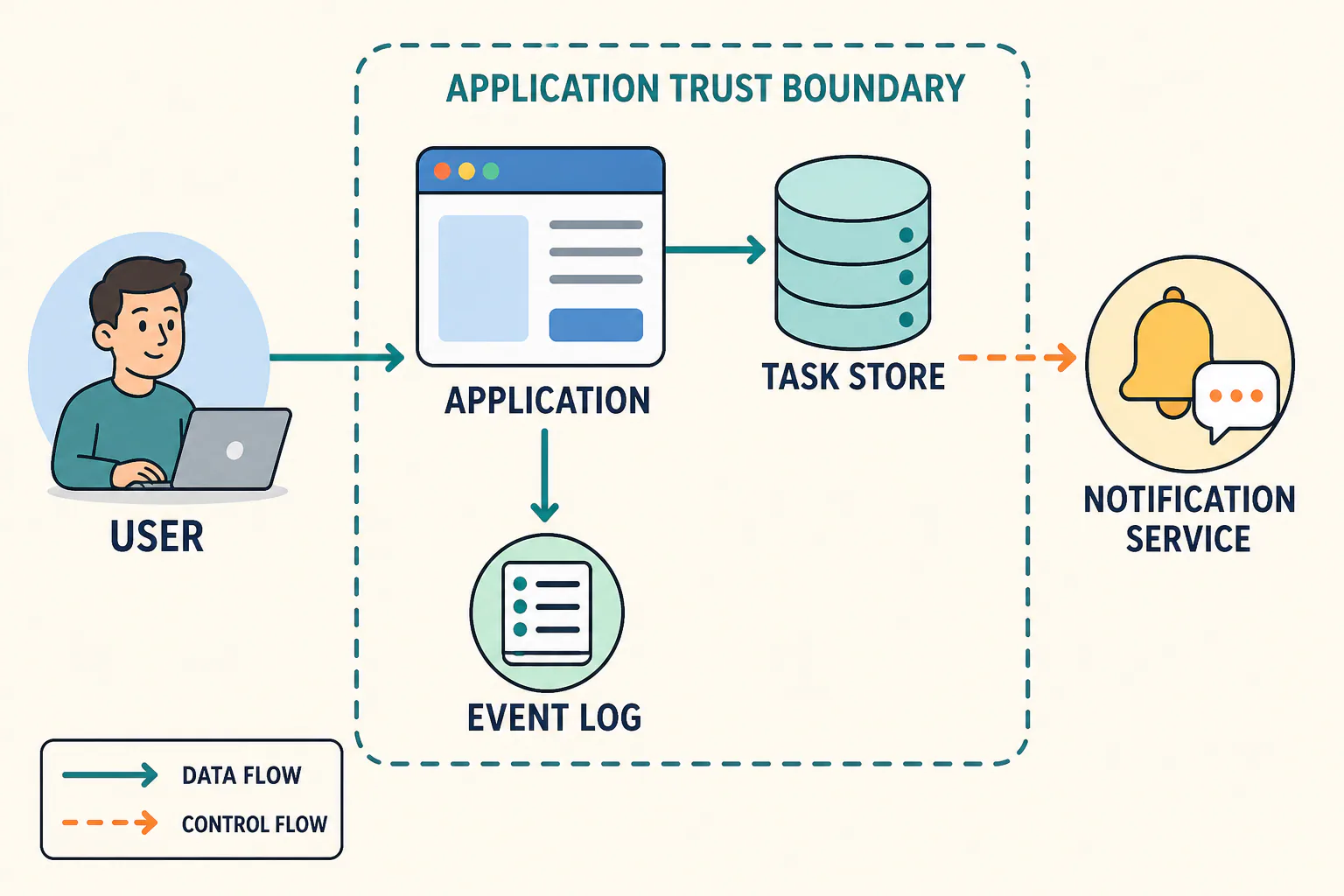
Figure 1. A reusable system-context map. The dashed application boundary means “the part of the system we are discussing.” It does not mean every component inside it is equally safe or equally trusted.
Read the diagram left to right:
- The user sends the app the task they want to save. The solid teal arrow is data flow: information is moving.
- The application process receives that information and stores the task. The task store is where the app remembers it.
- The application also records that a task was created in the event log. An event is a record that something happened.
- The dashed orange arrow is control flow: the application asks the notification service to do something next.
For now, “application” is a deliberately simple box. Later, that box may contain a model call, tools, memory, planning, or human review. The reading method stays the same: identify the parts, follow the information, and then identify the requested actions.
How it works
Section titled “How it works”Messages and structured data
Section titled “Messages and structured data”The save message needs a predictable shape so the application can read it. A common way to send a message to a web application is an HTTP request. You can picture it as an envelope: it names the destination, says what sort of request is being made, and can carry a message body. The application usually sends back an HTTP response to say what happened. RFC 9110 defines this shared HTTP vocabulary.
The message body is often written as JavaScript Object Notation (JSON). JSON is a plain-text way to organise named values. It is useful because people and programs can both read its shape. RFC 8259 defines the format.
{ "request_id": "req-104", "actor_id": "user-42", "action": "create_task", "task": {"title": "Send the brief"}}Read this example as a small form. request_id gives this request a label. actor_id says which user made it. task.title is the data the app should save. action says what the user wants the app to do. JSON can carry these values, but it does not prove that they are true or allowed. The application must still check that the user is permitted to create a task.
Identity, authority, and permissions
Section titled “Identity, authority, and permissions”Before the app creates a task, it needs to know who is asking. An identity is the answer to “who or what is this?” In our story, user-42 is an identity. An actor is the identity that is asking for the action right now. Here, the user is the actor.
Authority means the power to cause an effect. A permission is one small piece of authority, such as permission to create tasks. A user can ask to create a task, but the application should create it only if the user has the relevant permission. This is why “asked for” and “allowed to” are different ideas.
Credentials and tokens often carry identity or authorization information between security domains. For example, RFC 8693 describes security tokens and distinguishes a subject from an acting party. This chapter does not choose a particular login method. A later chapter explains how systems verify identities and enforce permissions.
Main variants
Section titled “Main variants”The same vocabulary fits several common shapes:
| Shape | What changes | What remains visible |
|---|---|---|
| Single process | One running program receives the save request, remembers the task, and replies. | Who sent input, what changed, and what reply was returned. |
| App plus queue | The app records work, and another program receives the event later. A queue is a waiting line for messages. | What happened now and what may happen later. |
| App plus tool | The app sends a request to another service, such as a calendar or notification service. | Who is allowed to make the request and what happens outside the app. |
Do not infer trust from proximity. A database in the same deployment can hold sensitive data, while an external API can be carefully limited. The boundary tells you where administration, credentials, or expectations change; the later threat model makes those assumptions explicit.
Minimal implementation
Section titled “Minimal implementation”The word state means the system’s current remembered situation. Before you press Save, the task might not exist. Afterwards, it exists and is open. A transition is the change from one state to the next.
This compact line is a way to describe that change. Read it from left to right. It starts with what arrived and what the system already knew. It ends with what the system now remembers and what it told another component.
event + current state + authorized action -> next state + emitted events + side effects
For the request above, the application may evaluate:
create_task + no task req-104 + tasks:create -> task stored + task.created + notification requested
There are three results to keep separate. State is the saved task. An event is a record saying that the task was created. A side effect is a change outside this local save operation, such as asking the notification service to send a reminder. The task can be saved even if the notification later fails. Keeping these results separate is important for understanding both reliability and security later.
Framework implementations
Section titled “Framework implementations”No framework is required for this chapter. Framework names can hide the simple parts we have just learned. A framework’s “handler” is usually the running process that receives a request. Its database or cache is a store. Its software-development kit call is a message sent to another service. When a framework appears later, translate its labels back to this simple system map first.
Data flow and state changes
Section titled “Data flow and state changes”The following legend is the notation for later workflow diagrams.
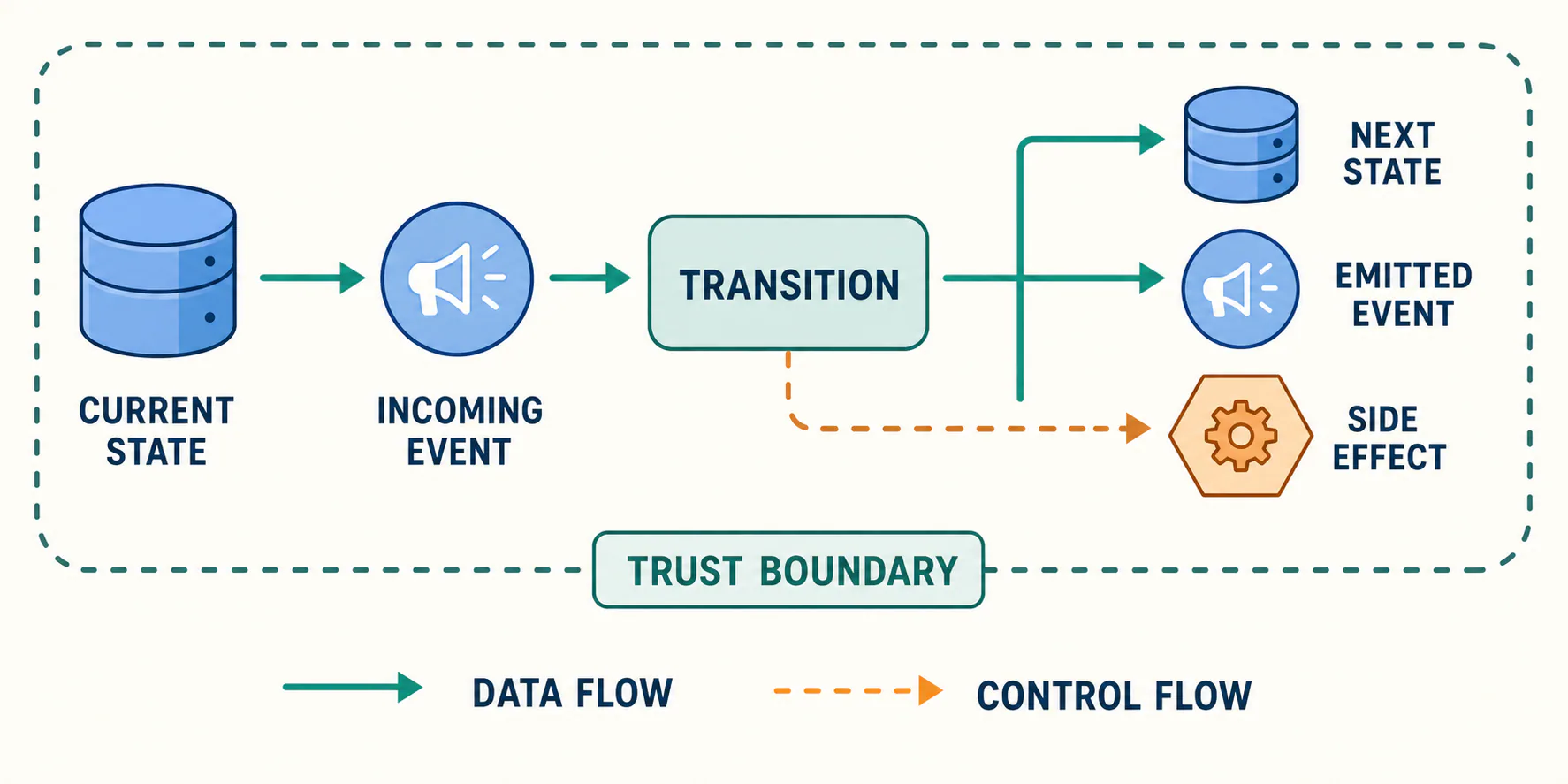
Figure 2. State-transition notation. A transition can be successful even when a later external side effect has not completed.
| Notation | Meaning | Question to ask |
|---|---|---|
| Solid teal arrow | Data flow | What values cross this connection? |
| Dashed orange arrow | Control flow | What decision, trigger, or command changes what happens next? |
| Cylinder | Durable state | What persists after this process stops? |
| Small circle | Event | What happened that another component may observe? |
| Dashed rounded boundary | Trust boundary | What assumption changes across this line? |
| Hexagon | Side effect | What changes outside the local state transition? |
The legend uses a solid teal arrow for information that moves and a dashed orange arrow for an instruction or trigger. A cylinder means remembered information. A small circle means an event record. A hexagon means an external effect. Ask the question in the last column whenever you meet one of these shapes in a later chapter.
An HTTP request and response are one way to exchange messages. An event can also arrive through a queue, a schedule, or another local program. HTTP itself does not remember application information between requests. The application chooses what to remember in its own store. RFC 9110 describes HTTP as stateless.
Trust boundaries
Section titled “Trust boundaries”A trust boundary is a line where the system must stop assuming that the previous component’s rules still apply. In the diagram, the task app and notification service are on different sides of a boundary. When the app sends a request across it, it should be clear what information is sent, which identity is used, and which actions are allowed.
Common boundaries include your browser talking to a website, one cloud account calling another, or an app calling a vendor service. A boundary is not automatically dangerous. It simply marks a place where expectations may change. Drawing it prevents a vague statement like “the agent did it” from hiding whether the user, the application, a credential, or an external service caused the effect.
Reliability failures
Section titled “Reliability failures”The story can have ordinary failures. The app may save the task but lose its reply before you see it. A queue may deliver the same event twice. The notification service may receive the request but take too long to answer. These are different facts: “the task was saved,” “an event was recorded,” and “a notification was observed.”
This chapter does not prescribe retry behavior. Later reliability material will cover delivery guarantees and recovery. For now, preserve enough identifiers, state, and events to say which part completed.
Worked example
Section titled “Worked example”Run the mocked request locally:
python3 examples/00-prerequisites/01-reader-contract-and-system-map/task_transition.pypython3 -m unittest examples/00-prerequisites/01-reader-contract-and-system-map/tests/test_task_transition.pyThe example is a small local version of the task-app story. It receives a JSON-like request, checks the tasks:create permission, saves one task, and records one event. It does not actually contact a notification service. Instead, it records that a notification was requested. That deliberate omission shows the difference between saving a task, recording an event, requesting an effect, and observing a completed effect. See the example README for expected output and limitations.
Limitations and trade-offs
Section titled “Limitations and trade-offs”These diagrams leave out several real-world details. They do not show two requests arriving at once, a retry after a failure, the order in which messages arrive, or the detailed rules that decide permission. They are a reading aid, not a deployment design. A real system may have several stores and several boundaries, even inside one organisation.
The diagram also does not claim that every agent uses HTTP, JSON, a database, or an event log. It provides a stable vocabulary for comparing implementations that do.
Security preview
Section titled “Security preview”Security work begins by identifying the assets, actors, authority, boundaries, and side effects in this map. NIST treats risk as the combination of an event’s likelihood and consequences, and includes security and resilience among trustworthy AI characteristics. NIST AI RMF 1.0 provides broad risk guidance. The threat model will apply these terms to agent-specific systems; this chapter does not yet analyze attacks or controls.
Open research questions
Section titled “Open research questions”When later chapters introduce distributed retries, should their delivery guarantees be taught in the reliability section or collected in a short appendix? The answer depends on whether readers need those guarantees before the first multi-step workflow.
Key takeaways
Section titled “Key takeaways”- An agent is a complete goal-directed system. A model can be one part of that system.
- Follow a system by asking: who sent information, which running program handled it, what was remembered, and what was asked to happen next?
- Data is the information being discussed. Control is the requested next action. A request is not automatically permission.
- State, events, and side effects are different results. Keep them separate when reading later diagrams.