
Human control, approval, and escalation
Place explicit human decisions in a run, bind approval to a concrete proposal and define escalation and resumption behavior.
- Distinguish clarification, review, approval and escalation.
- Design a paused approval lifecycle with expiry and revalidation.
- Explain human-in-the-loop and human-on-the-loop roles.
Why this matters
Section titled “Why this matters”The assistant has enough information to reserve two lamps, but the shop’s workflow asks Lee to confirm before stock changes. Lee may respond immediately, reject the proposal or return tomorrow. The runtime must know what decision is pending and whether the original proposal still makes sense.
A human control point changes the workflow, not just the conversation. It connects a named decision to the execution environment and the action that may follow.
How it works
Section titled “How it works”Name the kind of human input
Section titled “Name the kind of human input”Clarification supplies missing task information, such as which order Lee means. Review examines an output or proposal and may suggest changes. Approval grants permission to proceed with a specified action. Confirmation asks a person to verify intent or details; in our reservation workflow, it supplies the required approval decision. Rejection declines that proposal.
Escalation transfers a decision or task to someone with appropriate authority or expertise. An assistant unable to resolve conflicting delivery instructions may send a case to an operator rather than repeatedly asking the customer the same question. This is a workflow outcome, not evidence of model failure alone.
Human-in-the-loop means a defined step depends on human input before it proceeds. Human-on-the-loop means a person observes ongoing work and can intervene, without deciding every step. These roles can coexist: the assistant reads stock automatically, pauses for a reservation decision and remains visible to an operator.
Match autonomy to consequences
Section titled “Match autonomy to consequences”Autonomy is the scope of decisions the system can make without new human input. For our shop, consider both consequence and reversibility:
| Action class | Example | Human role in this illustrative design |
|---|---|---|
| Observation | Read available stock | Monitor automatically executed reads |
| Revisable local output | Draft a pickup note | Review or edit the draft |
| Customer-visible effect | Send the pickup note | Approve the exact recipient and message |
| Difficult-to-reverse commitment | Submit a custom manufacturing order | Escalate to an authorized specialist |
This is a design example, not a universal rule that all messages require approval. Existing user instructions and application policy may already authorize an operation. A useful control point resolves a real decision and supplies the information needed to make it.
Pause with a concrete proposal
Section titled “Pause with a concrete proposal”Our pending reservation contains a proposal ID, item and quantity, target shop, current resource version, consequence summary and decision deadline. A resource version identifies the state used when preparing the action. The reviewer needs to see what would happen, who it affects and what remains uncertain.
Record the trigger, required reviewer role, accepted decisions and outcome for no response. Our queue expires unattended proposals. Expiration is not approval. Other workflows might escalate an overdue case, but that outcome also needs to be defined.
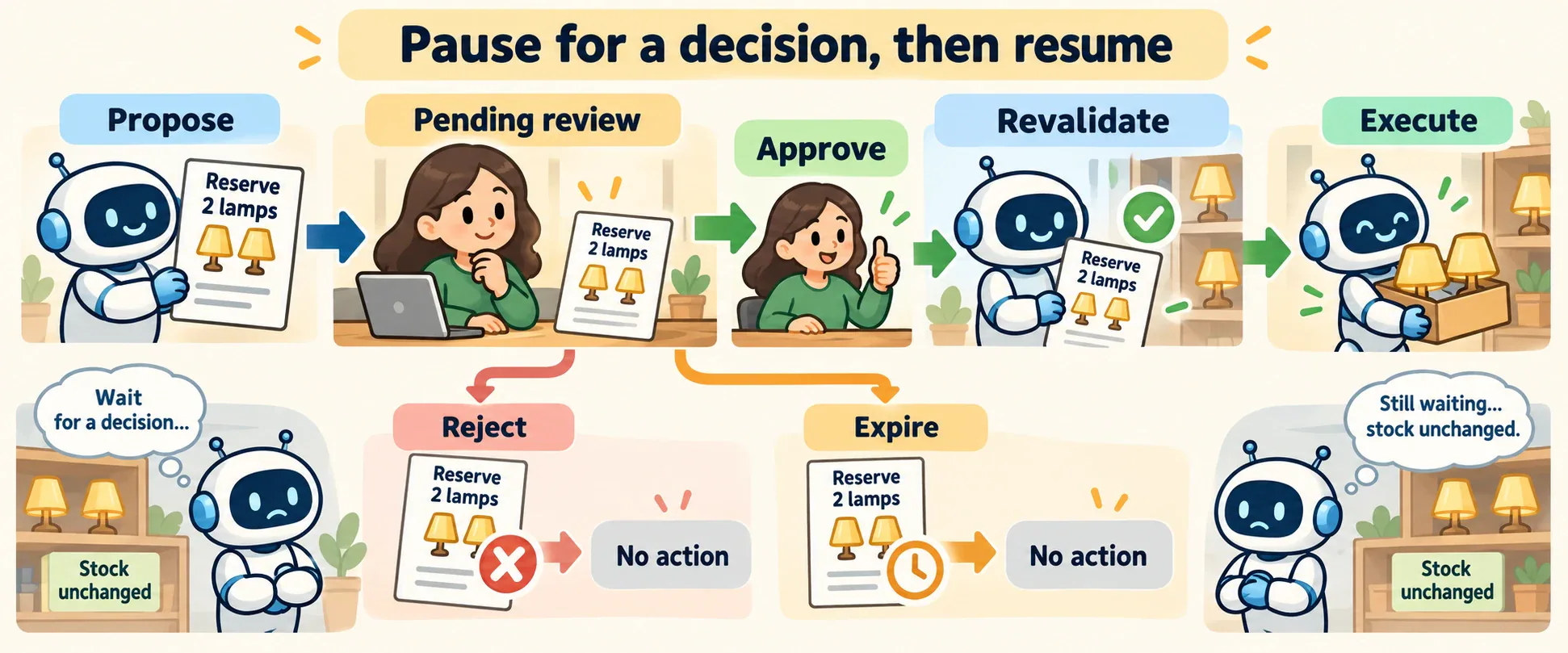
Figure 1. The action stays pending while the reviewer decides. The approved path checks that the proposal is still current before execution. The rejection and expiry paths end without the proposed effect.
Resume the decision that was made
Section titled “Resume the decision that was made”Resumption continues a paused workflow using recorded state. It should refer to the same proposal and decision, rather than interpreting an unrelated chat message as approval. Changed arguments or changed relevant resource state may require a new proposal.
The runtime distinguishes decision received, decision accepted, action dispatched and action completed. Observability gives these transitions a common record. Approval does not establish that the external operation succeeded.
The OpenAI Agents SDK exposes pending tool approvals as interruptions; RunState supports approval, rejection and resumption. It also supports serializing paused state for later decisions. These mechanisms package the lifecycle, while application policy determines reviewer authority and proposal freshness. SDK human-in-the-loop.
Minimal implementation
Section titled “Minimal implementation”The mock approval queue checks reviewer role, expiry and resource version. It rechecks expiry and version before executing. Its assertions cover execution before approval, a wrong reviewer, rejection, expiry, stale state, state changing after approval and repeated execution requests.
Expand minimal Python implementation
if item["status"] != "approved": return "not_ready"if now >= proposal.expires_at or version != proposal.resource_version: item["status"] = "needs_new_review" return item["status"]This mock uses an in-memory queue, fake clock and a list of effects. Real systems need authenticated reviewers, durable records and service-side concurrency semantics. A version check followed by a remote write is not automatically atomic.
Framework implementations
Section titled “Framework implementations”AutoGen offers immediate feedback through UserProxyAgent and feedback between stopped runs, where application code can persist team state. The in-run proxy blocks the team and is intended for short interactions. HandoffTermination can stop a team when control transfers to a user. These options differ from keeping a durable approval queue outside an active call. AutoGen human-in-the-loop.
Limitations and trade-offs
Section titled “Limitations and trade-offs”More approvals increase reviewer workload and waiting time. Fewer approvals give the runtime greater responsibility for interpreting existing authority. Measure whether reviewers understand the proposal and whether the workflow routes cases to someone able to decide.
If the proposal has become stale, ask for a decision on the revised action. Do not silently apply an old approval to a new quantity or recipient. Separate acceptance of a decision from the eventual success or uncertainty of its external effect.
Security preview
Section titled “Security preview”Human participation is not a guarantee of correctness. Pass 2 examines approval fatigue and deceptive interfaces in human interfaces and observability security.
Key takeaways
Section titled “Key takeaways”- Specify whether a person clarifies, reviews, approves, monitors or takes over.
- Bind approval to a concrete, current proposal and an authorized reviewer.
- Define rejection, expiration, escalation and resumption explicitly.
- Record the decision separately from execution and its outcome.
Check your understanding
Can approval of proposal version one authorize changed arguments in version two? The example binds approval to the reviewed version and requires another decision after changes.
References
Section titled “References”- OpenAI. Agents SDK human-in-the-loop.
- Microsoft. AutoGen human-in-the-loop. Living framework documentation, verified for this run.